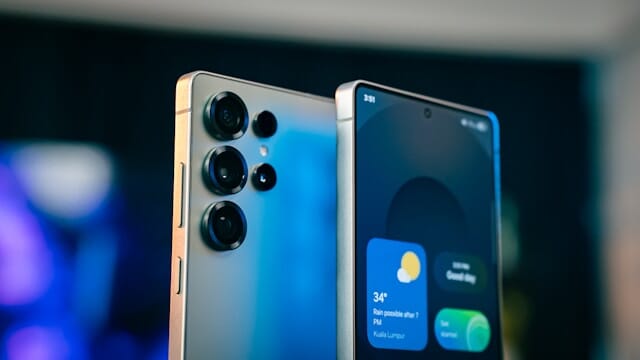
Samsung has confirmed its AI-powered call screening – originally exclusive to the Galaxy S26 series – is now heading to the Galaxy S25 range, Z Fold 7, Z Flip 7, and Galaxy TriFold with the stable One UI 8.5 update. The feature lets Galaxy AI answer calls, ask who is calling and why, show you a live transcription, and let you jump in or decline anytime. Enable it in Phone app settings, and say goodbye to unwanted interruptions.
. Samsung listened to Galaxy fans who demanded the smart call screening feature that debuted on the latest S26 flagships. Thanks to huge demand voiced on the company’s South Korean community forum, the tech giant confirmed the rollout to older devices. Now your trusted older Galaxy phone can finally fight spam and scams like the new models do.
This is big news for anyone tired of unknown numbers ringing at the worst times. The AI assistant steps in politely, gathers details, and gives you full control without forcing you to pick up. No more guessing or stressing. You stay informed and in charge.
 Samsung Is Discontinuing Its Messages App in July 2026 - Here's Why
Samsung Call Screening Feature for Older Devices
Samsung’s call screening uses Galaxy AI to handle incoming calls intelligently. It started as an S26 exclusive, but recent forum notices and official confirmations changed everything. A Samsung representative directly told users the feature arrives with One UI 8.5 on selected older flagships and foldables.
PhoneArena and Android Police reported the shift just hours ago, citing the South Korean forum update. Fans celebrated because the AI tool finally reaches devices many still use daily. The move shows Samsung responding to real user feedback instead of locking premium AI behind the newest hardware.
How the Samsung Call Screening Feature Works
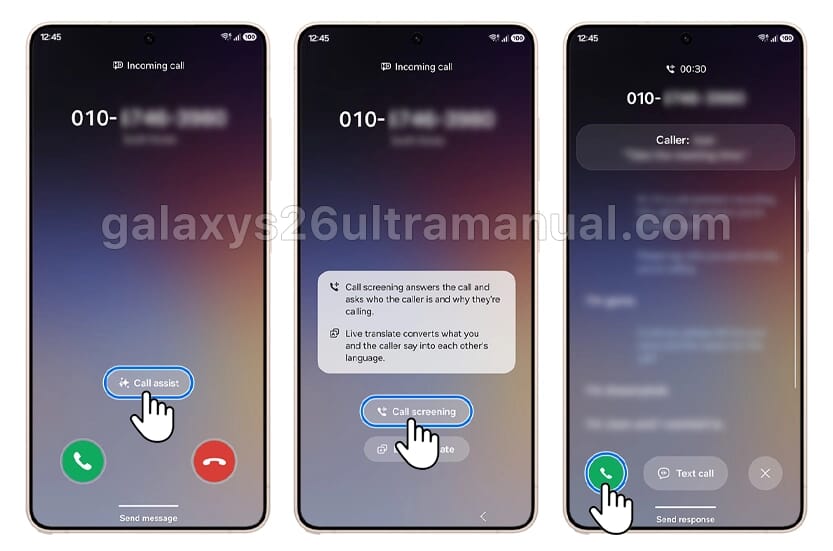
Picture this: your phone rings from an unfamiliar number. Instead of answering blindly, you tap Call Assist on the incoming screen and choose Call Screening. Galaxy AI springs into action immediately.
The AI plays a friendly voice greeting to the caller. It asks them to state their name and the reason for the call. While the caller speaks, you see every word appear as a real-time transcription on your screen – even if the phone is locked.
You read the live text and decide right then. Swipe the green phone icon to take over the call yourself. Or swipe the red icon to let the AI politely tell the caller you are unavailable. If you prefer texting, tap Text Call and send a preset or custom message without ever speaking.
The whole process feels seamless and respectful. Standard carrier call rates may apply during screening, but the feature saves you time and protects your peace. Samsung built in smart options like auto-screening suspected spam and scams or unknown callers only. You choose the level that fits your life.
How to Use Call Screening on Galaxy S26 Ultra
Step-by-Step: Enable Call Screening on Your Galaxy Phone
Activating the feature takes seconds and works the same across supported devices. Open the Phone app on your Galaxy phone. Tap the three vertical dots in the top right for More options. Select Settings, then scroll to Call screening and flip the switch on.
Inside the settings you will find handy tweaks. Turn on Auto screen calls to let AI handle unknown numbers automatically. Pick your preferred language for accurate transcriptions and even customize the assistant’s voice and speaking speed. These options make the feature feel personal instead of robotic.
Once enabled, the Call Assist button appears on every incoming call screen. Tap it, choose Call screening, and let Galaxy AI do the rest. You stay in control the entire time. Samsung notes the feature needs the latest software and enough storage space to run smoothly.
Compatible Devices Getting Samsung Call Screening
Samsung confirmed the feature for these older devices with the One UI 8.5 stable update:
- Galaxy S25 series (S25, S25+, S25 Ultra)
- Galaxy Z Fold 7
- Galaxy Z Flip 7
- Galaxy TriFold
The list focuses on recent flagships and current foldables that already run advanced AI features. Earlier reports from late March suggested the tool would stay locked to S26 models only. The quick reversal came after users pushed back on the community forums. Samsung’s moderator responses and the new notices prove the company prioritizes broader access when demand is strong.
Note that not every One UI 8.5-eligible phone receives call screening yet. The rollout targets the S25 lineup and latest foldables first. If your device is not listed, keep an eye on future updates – Samsung hinted more models could join later.
Why This Release Matters to Galaxy Users
Spam calls waste minutes and raise stress levels every single day. With AI call screening now reaching older devices, you regain control without upgrading your hardware. The live transcription lets you judge urgency instantly. Important calls from doctors, schools, or family get answered fast. Robocalls and scammers get filtered out politely.
Users love the emotional relief. No more heart-pounding unknown caller anxiety. The AI handles the awkward “who is this” conversation so you do not have to. And because you can jump in anytime, you never miss a genuine opportunity.
Samsung built the feature with privacy and clarity in mind. Conversations stay on your screen, and you decide every outcome. The customization options – language, voice speed, auto-screen levels – ensure it fits your routine perfectly.
Get the Most Out of Call Screening Right Now
After the One UI 8.5 update lands on your supported device, update your Phone app and enable the feature immediately. Test it with a safe unknown number to see the transcription flow. Adjust auto-screen settings based on your typical call volume.
Many users combine call screening with Live Translate for international calls. The AI still screens while translating in real time. The result feels futuristic yet simple.
Samsung continues to refine Galaxy AI tools based on feedback. The call screening expansion proves the company hears its community. If your exact model is not on the list today, the forum success story shows change can happen quickly.
You finally have the tool you asked for. Update when One UI 8.5 arrives, enable call screening, and enjoy quieter, smarter days. Your Galaxy phone just got a powerful new defender against unwanted calls – and it feels great to be in control again.
Read More
Samsung Can Now AirDrop Files to iPhone. Here's Exactly How It Works.
Samsung One UI 9 Brings Exciting Upgrades to Your Galaxy Phones- Here's What You Need to Know
![Whatsapp Logo]() WhatsApp Is Testing a Feature That Shows All Your Online Contacts in One List
WhatsApp Is Testing a Feature That Shows All Your Online Contacts in One List![Apple iPhone]() Apple Releases Rare Security Update to Shield Older iPhones from DarkSword Threat
Apple Releases Rare Security Update to Shield Older iPhones from DarkSword Threat
 WhatsApp Is Testing a Feature That Shows All Your Online Contacts in One List
 Apple Releases Rare Security Update to Shield Older iPhones from DarkSword Threat