WhatsApp just changed the way you talk to people. On March 26, 2026, Meta rolled out a major upgrade to its Writing Help feature, and this time, the AI does not just clean up your words. It reads your entire conversation and writes a reply for you.
This is not a small update. It marks the moment AI moved from a side tool into the heart of private messaging.
 WhatsApp Is Finally Preparing Scheduled Messages – The Feature Users Have Waited For Is Here in Beta
What Is WhatsApp Writing Help and How Did It Start
Writing Help first launched in August 2025 as a rephrasing tool. It let you rephrase, proofread, or adjust the tone of a message you had already typed. It could not see your conversation. It only touched what sat in the text field.
The old version gave you three alternate rewrites. You picked one, sent it, and moved on. WhatsApp's demo had someone asking it to rephrase "Please don't leave dirty socks on the sofa." The AI replied with "Hey, sock ninja, the laundry basket is that way." Useful, but limited.
The March 2026 update changes everything. The AI now sees the full thread before it writes a single word.
How WhatsApp AI Draft Responses Work in 2026
The updated Writing Help reads conversation context to suggest replies, shifting from a passive editing tool to an active participant in the exchange. That is a significant leap.
By analyzing the context of a chat, WhatsApp can suggest responses that align with the tone and flow of the conversation, helping users craft responses more efficiently within chats.
You do not have to type a single word first. You open the chat, trigger the feature, and let it draft something that actually makes sense in context.
WhatsApp chats to get an AI upgrade: Writing help to fix grammar mistakes, change tone of text | Technology News - The Indian Express
How to Use WhatsApp AI Replies Step by Step
Using the feature is straightforward. Here is exactly how to access it:
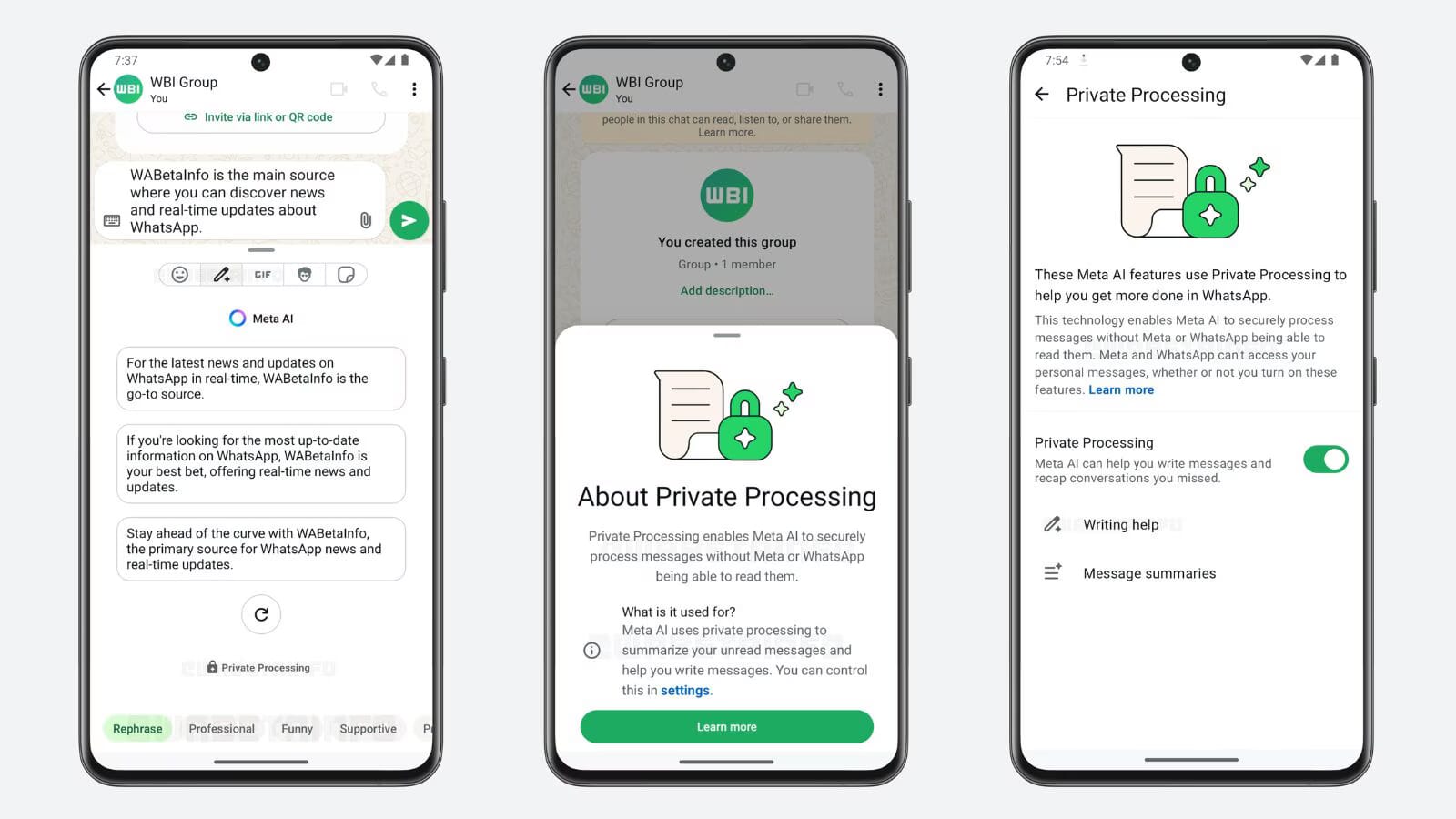
To access the feature, users tap the chat bar, select the stickers icon in the typing field, and then tap the pencil with sparkledust icon indicating an AI feature.
From there, the AI reads the conversation and generates a draft. You can edit it, discard it, or send it as is. The choice is always yours.
The diagram above shows the full flow from opening a chat to sending your AI-assisted reply.
Is WhatsApp AI Private and Does Meta Read Your Messages
This is the question everyone is asking. And the answer deserves more than a yes or no.
Writing Help uses Meta's Private Processing technology, which allows users to receive AI-generated responses without Meta or WhatsApp reading the original message or the suggested rewrites.
Meta calls it a secure enclave. Your messages process without being stored or read by the company.
Yet that privacy assurance faces an inherent tension: generating contextually relevant replies requires the AI to process conversation content, even if Meta says processing happens in a secure enclave.
You need to decide whether you trust that assurance. For business communication or public conversations, most users will likely find the tradeoff worthwhile. For private family chats, that decision is more personal.
What Other New WhatsApp Features Launched Alongside AI Drafts
Writing Help is the headline feature, but WhatsApp also introduced several other updates aimed at improving usability and performance alongside the AI drafting tool.
WhatsApp can now help users find and delete large files directly within any chat. This means users can get rid of what they don't need without having to wipe entire conversations, choosing to clear only media files while keeping the chat history intact.
Users can also now perform light photo editing tasks such as removing backgrounds, changing styles, and deleting elements from images using Meta AI, without leaving the messaging interface.
WhatsApp now also supports moving chat history from iOS to Android, as well as within the same platform. Plus, users can have two WhatsApp accounts logged in at the same time on iOS, a feature already available on Android.
One update is a strong quality-of-life improvement. Five updates together represent a platform rethink.
Why Meta Is Pushing AI So Hard Inside WhatsApp
Meta AI went from 500 million to one billion monthly active users in eight months, fueled almost entirely by embedding the assistant into WhatsApp, Instagram, and Facebook search bars, with no separate download or new account required.
Writing Help fits that exact playbook. Over the past 18 months, Meta has been embedding Meta AI across Facebook, Instagram, and WhatsApp to keep users within its ecosystem rather than switching to external tools.
Meta is likely hoping that people use its in-app technology when drafting messages, rather than external tools like ChatGPT. When two billion people already open WhatsApp every day, reducing friction to AI use is a massive strategic advantage.
Will Users Actually Want AI to Write Their WhatsApp Messages
This is the honest question. And the answer is: it depends on the conversation. While tools like Writing Help may improve efficiency, they also introduce a shift in how users interact, blending human communication with AI assistance.
For a quick response to a work contact, a follow-up to a client, or a message when you genuinely cannot find the words, AI drafting makes real sense. For a heartfelt message to a friend going through a hard time, most people will rightly skip it.
Recipients receive no disclosure that a message was AI-generated. That is the detail worth sitting with. The person on the other end of your conversation has no way to know whether you wrote those words or a language model did.
The Bigger Picture for WhatsApp and AI Messaging
WhatsApp joins Apple and Google in offering AI-generated reply suggestions, entering territory that blurs the line between human and machine communication.
The race to embed AI into everyday communication is real and accelerating. The apps that win will be the ones that make AI feel useful without making it feel intrusive.
The difference between helpful assistant and creepy interloper is razor-thin. If Meta can nail the contextual understanding and make these drafts genuinely useful, it could change how people interact with messaging apps entirely.
These new features are rolling out now and will be available to all users soon, WhatsApp says. You may already have access. Open your chat bar and look for that sparkle pencil icon.