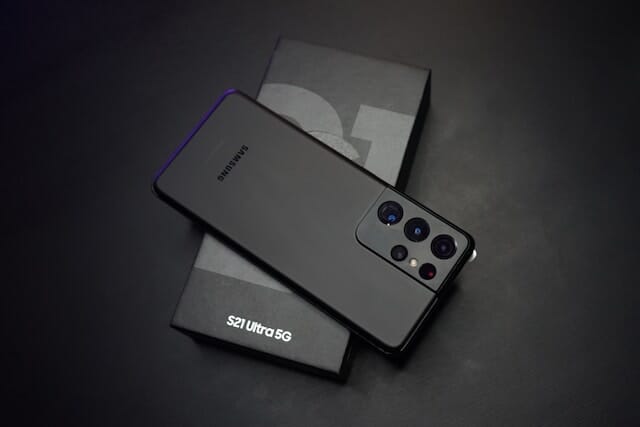
Samsung just expanded its satellite communication support across the globe. Announced on February 27, 2026, the feature now powers select Galaxy smartphones in key markets. You stay safe and connected when traditional networks fail.
 Samsung One UI 8.5 Beta: Everything You Need to Know About the Latest Update
Samsung Galaxy Satellite Communication Brings Peace of Mind
Samsung partners with leading telecom operators to make this possible. You gain access to emergency services, text messaging, and even data in dead zones. The technology feels like a lifeline during hikes, road trips, or natural disasters.
Users everywhere celebrate this upgrade. Families worry less about kids in remote areas. Adventurers explore with confidence. Samsung delivers reliable access exactly when you need it most.
How Samsung Galaxy Lets You Communicate Without Cellular Network
Your Galaxy detects no signal and switches to satellite mode. The phone prompts you with simple questions for emergencies. You point it toward the sky for a clear view and follow on-screen guidance.
The phone uses two technical standards to make this happen: Supplemental Coverage from Space (SCS), a regulatory framework defined by the FCC, and Non-Terrestrial Networks (NTN), a standard set by 3GPP.
Together, they allow satellite operators to beam connectivity to regular smartphones using the same flexible spectrum that cellular networks use on the ground.
Connection happens fast, often in seconds. Messages relay through satellites to response teams or recipients. You share your location and battery level automatically for quick help.
This works for eSOS alerts, T911 calls, texts, and limited data. Clear skies help most. Samsung rolls it out in phases based on your carrier and software version.
Which Galaxy Models Support Satellite Connectivity
The Galaxy S26 series leads the way with full support. You also get it on select flagship models after the S21 series and many after the S25 lineup. Certain Galaxy A series phones join in too.
Compatibility varies by region and carrier. Check your model in settings once updated. Samsung keeps expanding the list to more devices soon.
Owners of newer flagships feel especially thrilled. Older supported phones gain new life with this feature. Everyone benefits from the same safety net.
Global Carrier Partnerships Power the Feature
In the US, T-Mobile teams with Starlink for text and data services. Verizon offers eSOS and texting on post-S25 flagships. Samsung works closely with AT&T to add more options soon.
Europe sees support through Virgin Media O2 and Vodafone. Trials kick off with MasOrange in Spain this March. You enjoy seamless coverage across the continent.
Japan leads with KDDI since 2025 for texts, data, and earthquake warnings. SoftBank and docomo roll out more in 2026. Rakuten Mobile joins gradually.
These partnerships make the technology truly global. Samsung collaborates openly to strengthen infrastructure. You experience stable connections no matter where life takes you.
Apps That Work Over Satellite on Galaxy Phones
Samsung has quietly published a list of satellite-ready apps directly inside the device settings. You can find it at Settings > Connections > Satellite on any compatible Galaxy phone.
The list goes well beyond emergency SOS. It includes social messaging apps, navigation, and core Samsung services, which means you stay genuinely connected in remote areas, not just able to call for help.
Apps currently confirmed as satellite-ready include:
The presence of Google Maps and navigation tools is particularly valuable. Hikers, off-road drivers, and anyone traveling in remote areas can now check their location and send a message even when cell towers are miles away.
Samsung Galaxy vs Apple and Google: Satellite Approach Compared
Samsung takes a fundamentally different approach to satellite connectivity than Apple or Google, and it matters for what you actually get.
Apple and Google both have direct agreements with satellite providers. Apple works with Globalstar. Google uses Skylo. Both companies control the end-to-end experience and offer the service directly to device owners.
Samsung routes everything through carriers instead. Your network operator has its own deal with a satellite provider, and Samsung piggybacks on that relationship.
This creates more flexibility and potentially broader hardware reach, but it also means your experience depends heavily on which carrier you use.
The carrier gap: what this means for you
- T-Mobile (US): Galaxy S21 and newer get emergency services plus text and data via Starlink. The most complete offering available in the US.
- Verizon (US): Galaxy S25 and newer get emergency SOS and basic messaging via Skylo. Data services still in development.
- AT&T (US): Support is confirmed as coming but not yet live.
- Virgin Media O2 (UK): Satellite features rolling out now for select Galaxy phones.
- KDDI (Japan): Text, data, and earthquake/tsunami warnings on Galaxy S22 and newer since 2025. The most mature implementation globally.
The takeaway: before you rely on satellite connectivity, check with your specific carrier about what features are actually live on your plan.
How to Check and Use Satellite Messaging on Your Galaxy Phone
Accessing the feature is straightforward. Here is exactly what to do:
Open Settings on your Galaxy phone.
Tap Connections, then look for Satellite Networks or Satellite.
If your phone and carrier support it, you will see the feature listed here along with compatible apps.
In an emergency without cellular service, the phone detects the signal loss automatically and surfaces the satellite option.
Follow the on-screen guide to aim your phone toward the nearest satellite. A clear sky view gives you the strongest connection.
The system activates automatically when traditional cellular networks are unavailable, so you do not need to remember to turn it on in a crisis.
Real-World Benefits of No-Network Communication on Galaxy
Picture a sudden storm cutting off all towers. Your Galaxy still sends an emergency message. Rescue teams arrive faster because they know your exact spot.
Samsung emphasizes user safety above all. “As satellite connectivity becomes an important part of the mobile landscape, we are committed to ensuring Galaxy users have reliable access to communication, especially when they need it most,” said Won-Joon Choi, President and Head of Mobile eXperience R&D.
You feel empowered knowing help is always within reach. Daily life gains freedom. Remote work or travel no longer means being cut off.
What You Cannot Do Over Satellite on a Galaxy Phone
Satellite connectivity is a backup system, not a replacement for cellular service. Bandwidth is narrow by design.
Feature availability also varies dramatically by country. In the US, T-Mobile users get the richest experience. In many European markets, the rollout is still carrier-by-carrier. In some regions, only emergency texting is supported.
You will not be streaming video, uploading photos to Instagram, or browsing the web freely. The feature prioritizes text-based communication and location data, which are the things that actually matter when you are in trouble.
Future Expansion and Seamless AI Integration
Samsung plans to bring satellite support to even more Galaxy products. New models will arrive with stronger capabilities built in. Rollouts continue as networks and regulations evolve.
This fits perfectly into the AI era. Your Galaxy combines satellite links with smart tools for smoother experiences. Essential apps stay available when you need them.
The company keeps innovating through global teamwork. You watch the feature grow stronger with every update. Excitement builds for what comes next.
How to Get Started With Your Galaxy Satellite Feature
Update your software and check carrier availability first. Supported phones show the option automatically. Test it in a safe open area to see the magic.
Keep a clear view of the sky during use. Follow prompts carefully for best results. Your location and battery info help responders act quickly.
Samsung makes the process straightforward. You activate emergency mode or messaging with ease. Peace of mind comes built in.
Read More
- Meta’s Latest Safety Feature: An AI Detector Designed to Flag Emotional Manipulation and Scams
- Dutch Intelligence Warns of Massive WhatsApp and Signal Breach by Russian Hackers
- When Will Samsung Release One UI 8.5 and Which Devices Are Compatible?
- MacBook Neo: Everything You Need to Know About Apple's Breakthrough Affordable MacBook