Apple just dropped its latest release – iOS 26.3.1 (a). This update changes how your iPhone stays safe online. You need it now more than ever. Cyber threats never sleep. One wrong tap on a shady link could expose your personal info. Apple stepped up with this smart fix to keep you protected between big updates.
What Is the iOS 26.3.1 (a) Update?
Apple released iOS 26.3.1 (a) on March 17, 2026. It marks the very first Background Security Improvement for iPhone.
These updates deliver lightweight security patches fast. They target key parts like Safari and WebKit without waiting for the next full iOS version.
You already run iOS 26.3.1 from March 4? Then this (a) version appears separately. It builds right on top for extra defense.
Why Apple Created Background Security Improvements
Apple introduced Background Security Improvements with iOS 26.1. They replace older Rapid Security Responses. The goal? Give you important fixes quicker than ever. No full download required. Just targeted protection when you need it most.
Apple says these updates provide “important security improvements between software updates.” They recommend them for everyone.
You feel that instant relief knowing your iPhone gets smarter security without the hassle.
The Game-Changing Security Fix in iOS 26.3.1 (a)
This update tackles one critical issue in WebKit. WebKit powers Safari and every in-app browser on your iPhone. The flaw? A cross-origin problem in the Navigation API (tracked as CVE-2026-20643). Malicious web content could bypass the Same Origin Policy.
That means bad actors might sneak into data from other open tabs. Your banking info, passwords, or private messages could sit at risk.
Apple fixed it with improved input validation. Simple, right? Yet powerful. Your browsing stays locked down tight.
Safari’s Safe Browsing already blocks known bad sites. This patch adds another rock-solid layer.
How to Install iOS 26.3.1 (a) on Your iPhone – Step by Step
Forget the usual Software Update spot. Apple hid this one on purpose.
Open Settings on your iPhone. Scroll to Privacy & Security. Tap Background Security Improvements at the bottom.
You see the iOS 26.3.1 (a) option right there. Tap Install. It takes under five minutes on newer models.
Turn on Automatically Install for future updates. Your iPhone handles the rest.
Here’s exactly what the screen looks like:
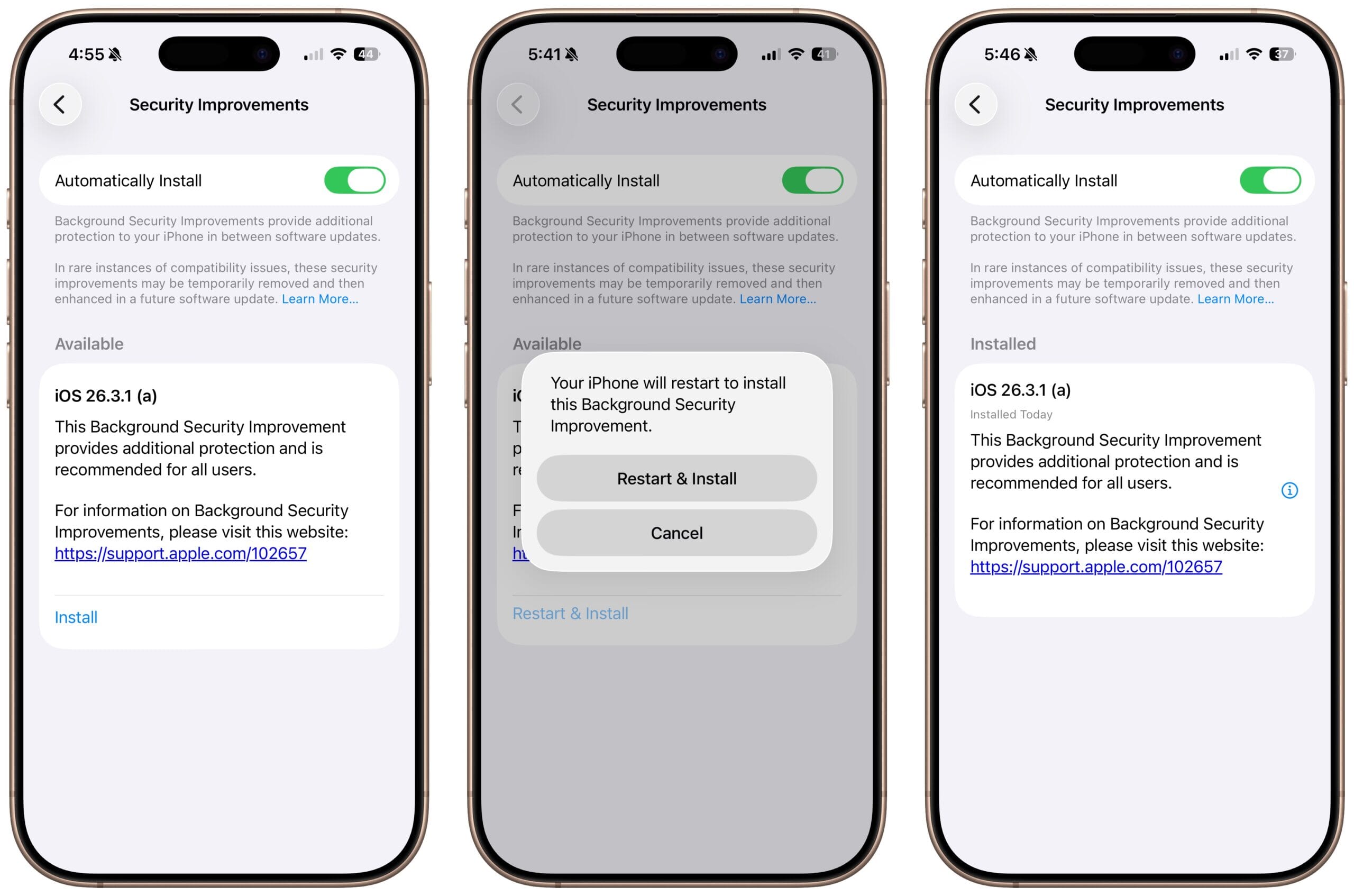
Your phone restarts to finish. Done!
Why You Need to Install iOS 26.3.1 Right Now
Hundreds of millions of iPhones run iOS 26. Apple wants every single one updated. This patch protects you from real-world attacks today. Why wait for iOS 26.4 when safety arrives in minutes?
You browse the web constantly – shopping, banking, chatting. One sneaky site should never steal your peace of mind.
Apple calls it “recommended for all users.” That urgency hits hard. Your data, your family photos, your life – all stay safer.
What Happens If You Skip the Update?
You stay on iOS 26.3.1 without this fix. The same protection rolls into the next regular update.
Yet you miss the immediate shield. Malicious content could still try that bypass trick.
Apple suggests Lockdown Mode for extra caution if you cannot update. But why risk it?
Install now. Feel confident every time you open Safari.
Who Can Install iOS 26.3.1 (a) and What Comes Next?
Any iPhone running iOS 26.3.1 qualifies. That covers iPhone 11 and newer models.
The update works on iPadOS and macOS too in matching versions.
If rare compatibility issues pop up, you can remove the Background Security Improvement. Just tap the info icon and restart.
Apple promises future enhancements if needed. Your iPhone stays current and secure.
Background Security Improvements Change the Game
Think of BSI as Apple’s quiet superhero. It slips in fixes between major releases. You get faster protection without big downloads or downtime. Future updates will follow this smart path.
Your iPhone feels more alive – always watching your back.
Protect Your Browsing with the iOS 26.3.1 Update
Safari and in-app browsers just got stronger. That green shield icon means business.
You browse freely knowing threats bounce off. No more hidden worries in the background.
Your Next Step Is Simple
Open Settings right now. Head to Privacy & Security. Tap that Background Security Improvements section.
Install iOS 26.3.1 (a) and lock in your protection. You deserve that peace of mind. Apple made it easy. Do it today and surf with confidence tomorrow.
This update solves your biggest worry: staying safe online without complicated steps. Your iPhone thanks you – and so will your data.
Read More
- Windows Emergency Update Fixes Microsoft App Access Issue for Thousands of Users
- X Releases AI Watermark Feature to Identify AI-Generated Content
- Amazon Is Building a New AI Smartphone. Here's Everything We Know.
- Samsung One UI 9 Brings Exciting Upgrades to Your Galaxy Phones- Here's What You Need to Know